
Install the Meter Rider App
Get the full app experience by installing Meter Rider on your device. It works just like a native app - faster, more reliable, and always available.
Safari Browser
Tap the Share button
Look for the icon at the bottom of your screen
Select "Add to Home Screen"
Scroll down and tap "Add to Home Screen"
Confirm installation
Tap "Add" in the top right corner
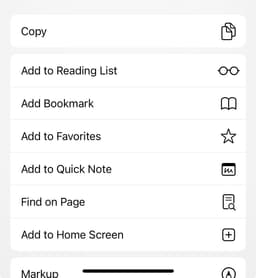
Step 1: Tap Share

Step 2: Add to Home
Chrome Browser
Tap the Menu button
Look for the three dots in the top right
Select "Add to Home screen"
Look for "Add to Home screen" or "Install app"
Confirm installation
Tap "Add" or "Install" to complete

Step 1: Menu

Step 2: Install
Chrome, Edge, or Safari
Look for the install icon
Check the address bar for a install button
Click install
Click the install button when it appears
Launch the app
Find it in your apps or on your desktop
Why install the app?
Faster Performance
Works instantly, even with poor internet connection
Native Experience
Feels like a real app on your device
Stay Updated
Get notifications for your rides and updates